Finish the last yard with the paperwork already done.

One man show running a lawn operation?

Mark a yard done in CK Lawncare, the lawn app we built, and the invoice is on their phone.

Pro: $477 to set up, then $87 a month

  1. Rain is likely Saturday. Saturday’s yards moved to Monday with 1 tap, and each of those customers got a text.
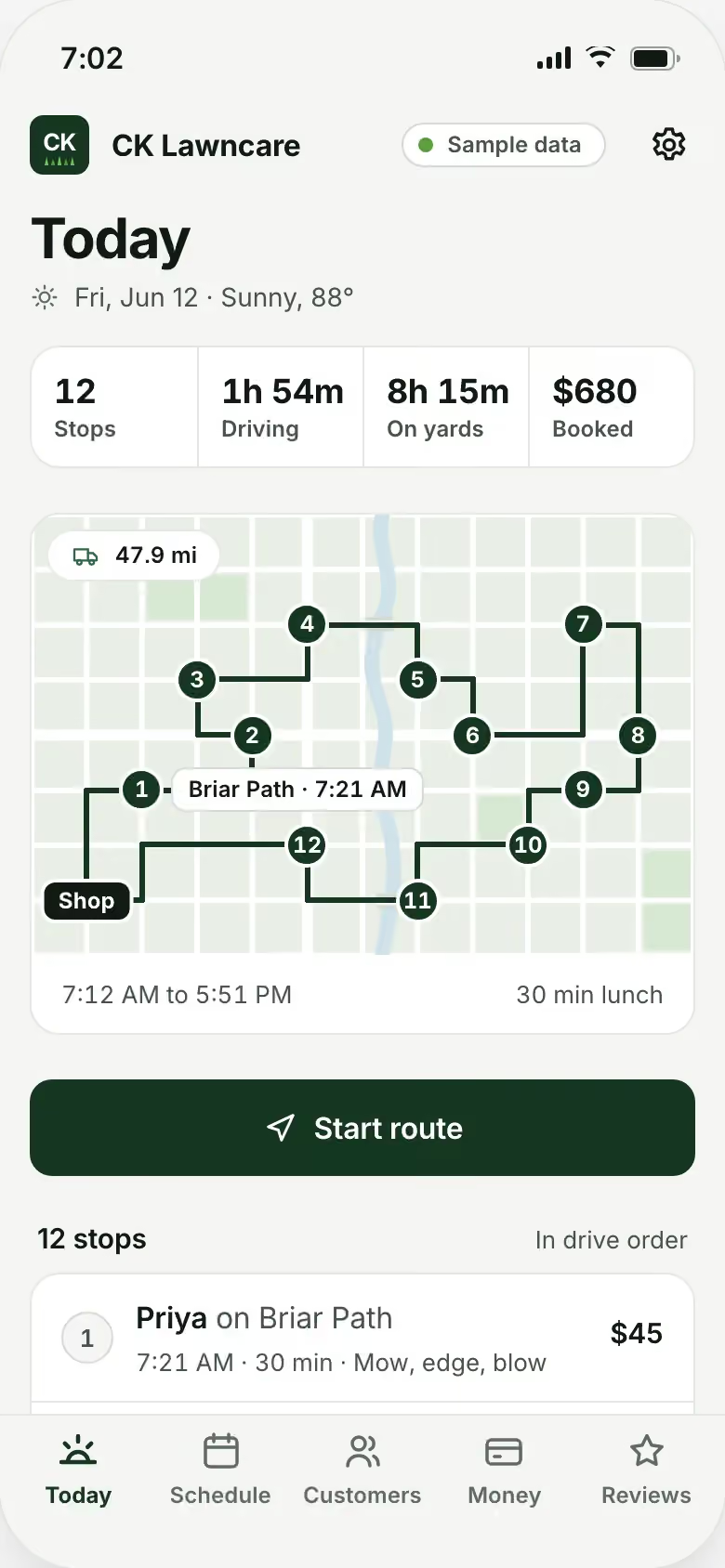
  2. Today’s stops load in order, each with its own note: the gate, the dog, where to park.
  3. Yard done. The after photo and a text go to the customer while you load the mower.
  4. The invoice is on their phone, and they pay it there. Today’s total goes up on your screen.
  5. A new neighbor asks for a price. On Pro, your AI teammate drafts the quote, and you approve it between yards.
  6. The review requests went out on their own, and the day is wrapped.

CK Lawncare. Real Joiner build. Sample data.

Notebooks, texts, sticky notes and 3 apps.

The route is planned before you leave, yards are billed as you finish them, and the day’s total is on your screen when you get home.

  • Notebooks, texts, sticky notes and 3 apps, and it’s all over the place.
  • It’s the time spent chasing payment that gets you.
  • No way you’re cutting 3 lawns a month just to pay for a scheduling app.
  • It rains, and the app won’t let you move the jobs.
  • The only reason you haven’t switched: they have all your customers.
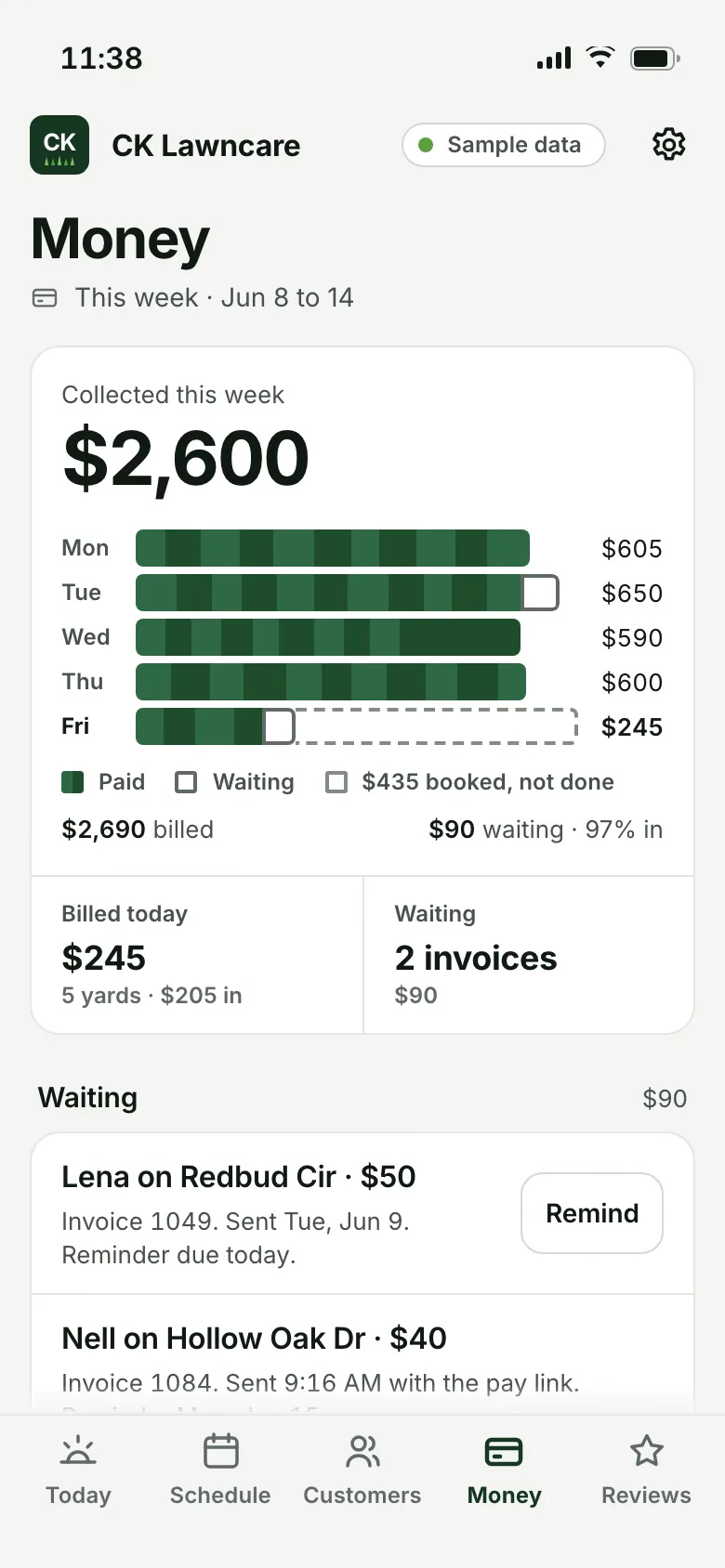
The CK Lawncare app on a phone: this week's money, billed, collected, waiting and expenses, with sample data.

CK Lawncare. Real Joiner build. Sample data.

Every yard on the route, billed and reviewed from your phone.

  • Today’s route, yard by yard

    Every stop, in the order you mow, with what you need to know at the gate.

    • Today’s route, in your order
    • Weekly and every-other-week yards on their own schedules
    • A note for each yard: the gate, the dog, where to park
    • An after photo on every job
    • Move a rain day in 1 tap
  • Paid from the customer’s phone

    Each yard billed when you mark it done, with a way to pay from the customer’s phone.

    • The invoice sent when the yard is done
    • Customers pay from their phone
    • A friendly nudge when a bill goes unpaid
    • Who still owes you, in 1 list
    • Today’s total and the week’s, at a glance
  • Reviews and new inquiries

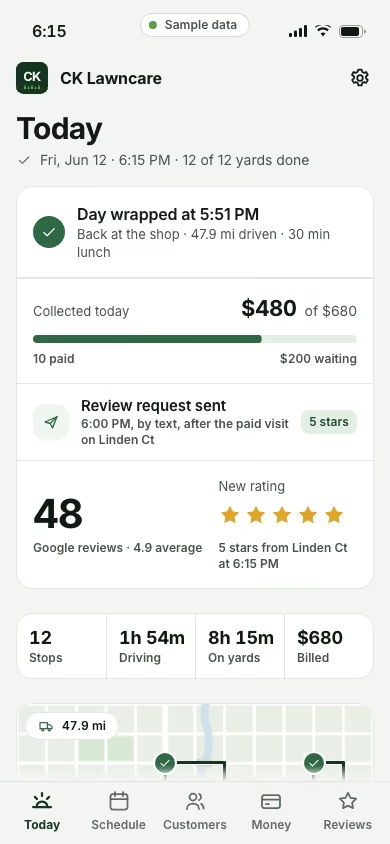
    A review request after a paid visit, and new inquiries answered while you mow.

    • A review request after a paid visit
    • An AI teammate that answers new inquiries and drafts quotes for your okay
    • Your Google rating and each new review’s stars

CK Lawncare

Real Joiner build. Sample data.

Try the demo

How to quote a lawn mowing job

Price your time first and the size of the yard second. Start with what you need to earn for every hour you’re on a property, after fuel, gear and the truck. Then price each yard by how long it takes you.

Before you drive out, look at the property on a satellite map. Look for the open turf and the beds you will trim around. Write down your guess in minutes. On the first visit, time yourself from the moment you unload to the moment you pull away. If the yard took 40 minutes and the drive to it costs you 5 more, you are pricing 45 minutes of your day. Adjust the quote before the second visit.

Overgrown yards need their own price. One lawn pro wrote that a neglected yard, with grass 2 feet tall, can take “triple the effort and labor.” Put a first-cut price in every new quote, in writing, and ask for a photo before you go. A quote that says “first cut, then weekly” up front shows the customer why the first bill is higher.

How to get paid on the day

“It is the time spent chasing it up that gets me,” one lawn owner wrote. Send the invoice the moment the yard is done, while the customer is looking at a fresh cut. Make it a text with a link they can pay from, in place of a paper invoice in the door.

Decide your rules once and write them in your service agreement:

  • When payment is due (the day of service, or within 7 days).
  • What happens after 14 days unpaid (you pause service).
  • Whether you keep a card on file for weekly customers.

For weekly customers, try a flat monthly price. You quote the year, divide it by 12, and bill the same amount each month. An owner who bills this way wrote that “quoting yearly and billing monthly allows me to predict my year more accurately.” Write down what the monthly price covers and what costs extra, like a first cut or a leaf cleanup.

Send a short, polite reminder at 3 days and again at 7. On Pro, your app sends invoice nudges on its own.

How to build a route that holds

Group your yards by day and by area, so each day’s drive runs in a line from yard to yard. Put every-other-week yards on alternating weeks so each week carries about the same load. Keep 1 open slot each day, or 1 open half day each week, for rain and redos.

Each yard needs a short note that travels with it: the gate code, the dog, where to park, the bed the owner cares about. Write it once, and you or your helper sees it every visit. When you add a new customer, put them on the day you already work nearby. Fill the streets you already mow before you take a yard across town.

Rain days, without the phone tag

Make the call by 6:30 AM. Push the whole day back 1 day, text every customer on it at once, and let the rest of the week slide with it. If the week fills up, move every-other-week yards first. They already go 2 weeks between cuts.

Keep a short list of yards that cannot wait: a rental showing, a party, a picky HOA. Those get the first dry slot.

The rain text, to copy: “Rain today, so your mow moves to Monday. Same price. Reply here if Monday doesn’t work.” Change the day, then send it to every customer on the moved list at once.

How to get your next lawn customers

Look first for new customers next to your current ones, on the streets you already drive.

  • Ask for a Google review the same day you finish a yard.
  • Keep your Google Business Profile full: your service area, your hours, real photos of real yards and every review answered.
  • Leave a door hanger on the 4 houses on each side of a yard you just cut.
  • USPS Every Door Direct Mail lets you mail to every home on the routes you choose, with no names or mailing list. Pick the routes that cover the streets you already mow. One lawn pro’s advice was short: “just use the post office every door direct campaigns.”

Do some of it every week. On Pro, your app sends the review requests for you.

What your lawn care app would do

A lawn care app with 4 screens you would open every day. Today: your route in your order, with the notes for each yard. Customers: every yard with its schedule, its price and its history. Money: what is billed, what is paid and who still owes you. Quotes: new yards waiting for your okay. Pro adds the automations that send reminders, invoice nudges and review requests, and an AI teammate that answers new inquiries and drafts quotes for you to approve. It would be built in your words and your order, on your phone and your computer.

Not ready to start? Have Otis audit your business, free.
Questions, answered

Is this overkill for a 1-man operation?

Solo is for 1 owner and 1 user: $250 to set up, then $47 a month. Your app holds your customers, jobs, schedule, quotes and invoices, in your words and your order. Pro, at $477 to set up and $87 a month, adds the reminders, invoice nudges and review requests that send themselves.

What happens to my customer list if I leave?

It leaves with you. You own your domain, your accounts, your website files and your data. Joiner owns the app and licenses it to you while your plan is active. You can ask for an export of your customers while your plan is active and for 30 days after it ends.

Is there a contract?

No. Every plan is month to month, through the busy season and the slow one, and renews monthly until you cancel. Cancel any time, and service runs to the end of the month you paid for.

I don't have 5 days to set up software. How much work is it for me?

You tell us how you run your route. We build the app around it and run it for you. The setup fee is refundable in full until the build starts, and we email you the day it starts.

How do my customers pay?

They get the invoice on their phone when you mark the yard done, and they pay it right there. On Pro, if it sits unpaid, the app sends a polite nudge so you don't have to.

Can it handle rain days and every-other-week yards?

Yes. Weekly and every-other-week yards each keep their own schedule, and a rain day moves with 1 tap. We build it around how you already handle both.

Why not one of the big lawn care apps?

If one fits the way you work, keep it. If you pay for screens you never open, or you want the reminders, invoice nudges and review requests to go out without you, that is what we build.

The plan that fits

Solo is the app. Pro adds automations: reminders, invoice nudges and review requests send themselves, and an AI teammate answers new inquiries and drafts quotes for your okay while you mow. The setup fee is refundable in full until the build starts, and we email you the day it starts.

  • Website build or refresh$447 setup + $27 a month on its own, or $397 setup + $27 a month with any plan
  • Google Business Profile setup$197 once
  • Local presence$147 a month

Renews monthly until you cancel. Cancel any time from the billing link in your receipt or by email to support@joinerlabs.com.

Every plan and price

Pro

Recommended

Your app plus an AI teammate

For teams up to 3

Setup, once
$477
A month
$87

USD. Renews monthly until you cancel. Cancel any time from the billing link in your receipt or by email to support@joinerlabs.com.

Start with Pro

Everything in Solo, plus

  • Up to 3 users, synced live
  • 1 AI agent that answers new inquiries and drafts quotes and follow-ups for your approval
  • Automations: reminders, review requests and invoice nudges
  • Priority support, same business day

Tell us how you work. We’ll show you what we’d build.

We reply within 1 business day.

We reply within 1 business day with what we would build and which plan fits. Nothing to pay until you say yes.

We use what you send to answer your request. Privacy Policy