We build the lift log that tells you what to lift next.

Still guessing what to lift next week?

A workout app of your own: 2 taps to log a set, and the next session planned from your log.

Personal: $47 to build, then $15 a month

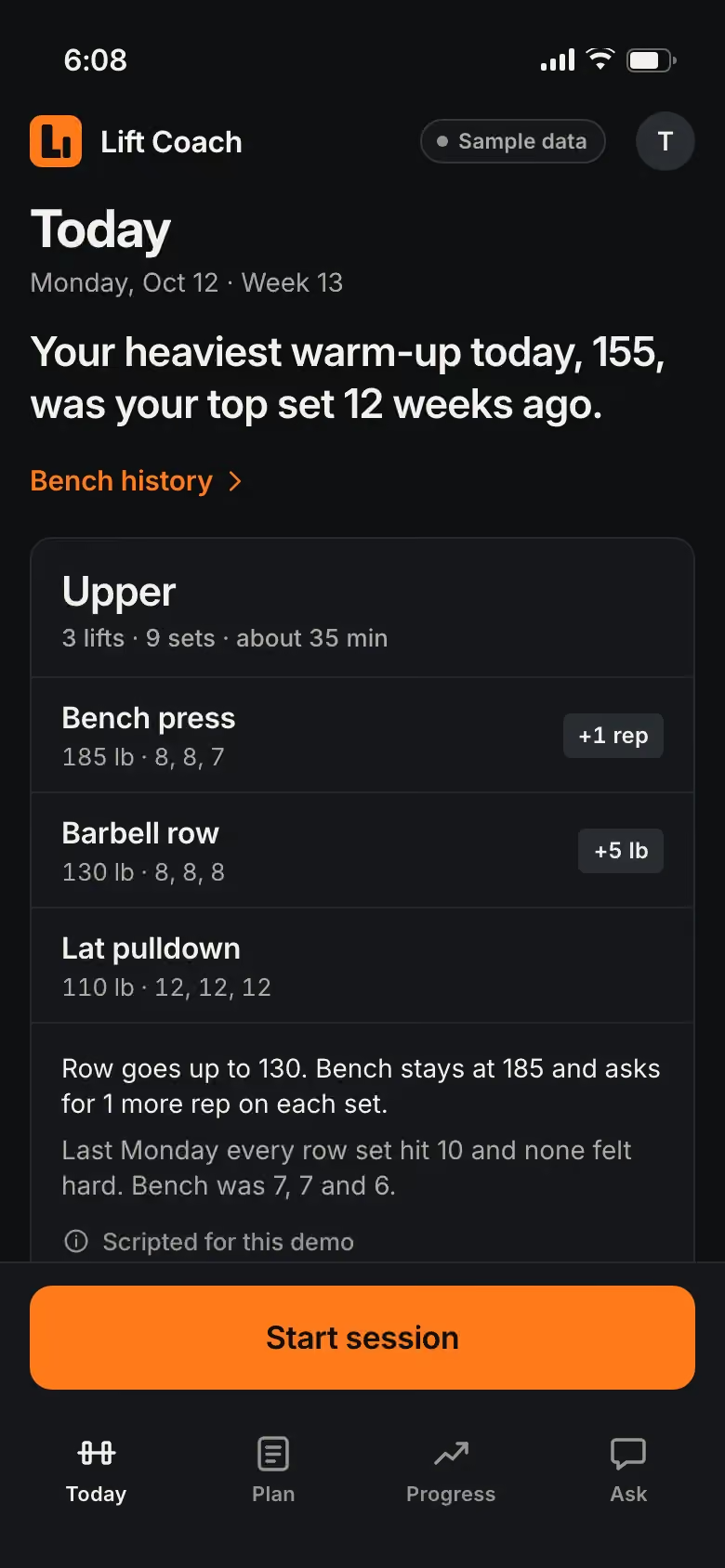
  1. Today’s session is planned from your last one: 3 lifts, the weights, and a line on why each one moves.
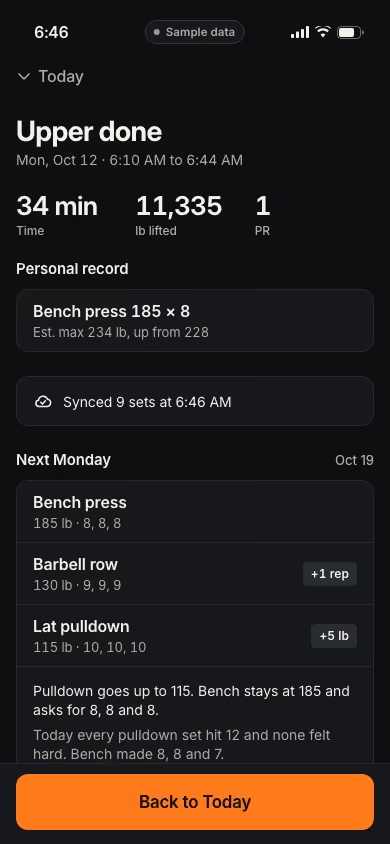
  2. Each set takes 2 taps: Done, then how it felt. The rest timer starts on its own, and a new best on bench gets a quiet mark.
  3. A set stops short: 1 tap, and next week’s plan changes with it.
  4. Done in 34 minutes. The session syncs, and your progress shows the new best.

Lift Coach. Real Joiner build. Sample data.

8 taps a set, then back to pen and paper.

You walk into the gym with the weights, the reps and the sets planned from your last session, and log each set as you go.

  • 8 taps to log a single set, then back to pen and paper.
  • Guessing what to do next, or stuck on the same weight for weeks.
  • Years of workouts, gone for no reason.
  • Yet another subscription for a glorified notes app.
  • You’d switch, but all your history is stored in their app.

Lift Coach. Real Joiner build. Sample data.

A coach for the plan, a scorekeeper for the numbers and a trainer to ask.

  • Your coach: the plan

    Today’s session and the next 3, planned from your log.

    • Today’s session, planned from your last one
    • The next 3 sessions, with a lift you can swap
    • A line on why each lift moves
  • Your scorekeeper: the numbers

    Your bests, your estimated max and 12 weeks of lifts at a glance.

    • Personal bests and an estimated max
    • 12 weeks of lifts in 1 chart
    • The weeks you trained, at a glance
  • Your trainer: the answers

    Ask about a sore shoulder or a missed week, and the answer can change the plan.

    • Questions answered in the app
    • Answers that can change the plan
    • Every set yours to export

Lift Coach

Real Joiner build. Sample data.

Try the demo

How much weight to add each week

A simple plan to start with is called double progression. Pick a rep range for each lift, like 6 to 8. Use the same weight until you hit the top of the range on every set. Then add the smallest jump you have and start again at the bottom of the range.

Here is how that looks on the bench. You press 135 pounds for 3 sets: 6, 7 and 6 reps. Next week, try for 7, 7 and 7. When you hit 8, 8 and 8, move to 140 pounds and start again at 6 reps a set.

Use the smallest jump you have, like 5 pounds on the bar for squats and deadlifts and 2.5 to 5 pounds for presses. If you can’t make the jump, stay at the weight for another week. Keep the jumps small and steady.

Write down the weight and the reps for every set, every time. For progressive overload, start each week from what you did last week.

How to know when to add weight or reps

Use reps in reserve: how many more good reps you could have done when you stopped. If your last set of 8 felt like you had 3 left, the weight is light. If you had 0 left and your form broke, it’s heavy. Aim to finish each working set with 1 or 2 reps left.

When every set of a lift ends with 3 or more reps in reserve, add weight next time. When they end at 0, hold the weight. Write the reps in reserve next to each set, so next week’s choice comes from what happened that day. Your notes set the plan, and in your own app the math would be done for you between sets.

Why you’re not getting stronger

Check these 4 first. You can fix each one:

  • No log. Without one you guess, and on a good day you can lift too much.
  • The same weight for weeks. If nothing tells you when to move up, it is easy to stay put.
  • Too many changes at once. Give a program time to work before you switch.
  • No easy weeks. Plan a lighter week every 6 to 8 weeks.

Pick 1 program, log every set and follow the rules above for 8 weeks before you judge it.

What to log, and what to skip

Log the lift, the weight, the reps and the sets. Add reps in reserve if you use it. Add a short note when something hurts or feels off. Skip everything else. Every extra field is 1 more tap between sets, so leave out what you don’t look back at. If you train with a partner, log your own numbers. Keep it simple, so you keep logging.

Keep your history yours

Years of training are worth protecting. Export your log once a month, whatever you use. Choose a tracker that lets you take your whole history with you, in a format a spreadsheet can open. Your log should never be the reason you stay with an app. If your app won’t export, copy your best lifts and your last month into a note today, so you still have your starting point if your log is ever lost.

Training around missed days and travel

A week of travel, a cold or a busy month can break a training plan, so plan for it. When you miss up to a week, pick up where you left off at the same weights. After more than a week off, start about 10 percent lighter and build back over 2 or 3 sessions. Before you leave, write down your last working weight for each lift, so you know where to start when you get back. On the road, keep the same lifts and use what the hotel gym has. If you miss a Tuesday, do that session the next day and keep the order of your week.

Lift Coach, the lift log we built

Lift Coach is a real Joiner build, shown with sample data. Today’s session is planned from your last one, with a line on why each lift moves. Each set takes 2 taps, and the rest timer starts on its own. Progress shows your bests, an estimated max and 12 weeks of lifts in 1 chart. Yours would be built around how you train, install on your phone’s home screen with no app store, and keep every set yours to export. Try Lift Coach.
Questions, answered

Why pay when free workout apps exist?

Some free trackers keep pushing you to upgrade, and some put your history or their useful features behind a paywall later. Yours is $47 to build and $15 a month, and you can export your data any time.

Couldn't I have AI write this for me?

You could. What we add is the running of it: hosting, updates and fixes for $15 a month, after $47 to build, with 1 change a month.

Can I get my data out?

Any time. You control the data in your app: you can export your whole history whenever you want while your plan is active, and you can ask us for an export for 30 days after your plan ends.

Will it follow my program?

Tell us the program you use now, from your coach, a book or a spreadsheet, and we confirm we can build it before you pay. Your app would follow it, so the plan, the percentages and the jumps match.

What if I miss a week?

The plan would pick up from your last real session: the same weights after a week off, a little lighter after a longer break, instead of resetting your whole schedule.

Will the plan push me too hard?

It would plan from your own numbers and move in the small steps you set, and you could change any weight before you lift. It would be a log and a plan, and it would give no medical advice.

The plan that fits

One app for 1 person, built from how you train: $47 to build, then $15 a month for hosting, updates, fixes and 1 change a month. The setup fee is refundable in full until the build starts, and we email you the day it starts.

Every plan and price

Personal

Your own app, built for you

For a person or a family

To build, once
$47
A month
$15

USD. Renews monthly until you cancel. Cancel any time from the billing link in your receipt or by email to support@joinerlabs.com.

Tell us your idea

What’s in it

  • Built from your plain words. We confirm we can build it before you pay
  • Installs on your phone’s home screen, no app store
  • Hosting, updates and fixes
  • One change a month
  • Your data, exportable any time
  • Cancel any time

Tell us how you work. We’ll show you what we’d build.

We reply within 1 business day.

$47 to build, then $15 a month, only after we confirm.

We use what you send to answer your request. Privacy Policy